

Buying software today looks nothing like it did ten years ago. Most people don’t want to book a call and sit through a slide deck. They want to try the product themselves, right now, on their own screen.
That’s exactly what an interactive product demo does. It lets a visitor click through a real (or realistic) version of your product without installing anything or talking to a salesperson first. In this guide, you’ll learn what an interactive product demo is, how it works, the different types available, and how to build one that actually turns visitors into customers.
What Is an Interactive Product Demo?
An interactive product demo is a clickable, self-guided walkthrough of a software product. Instead of watching a static video or reading a feature list, the visitor navigates the product screens themselves, clicking buttons, filling in fields, and moving through real workflows.
Think of it as a “try before you buy” experience that doesn’t require a free trial account, a download, or a sales call. Most interactive demos are built from screenshots or recordings of the actual product, with clickable hotspots layered on top to guide the user through a specific story.
How Does an Interactive Product Demo Work?
Behind the scenes, most interactive demos follow the same basic process:
- Capture – The team records or screenshots the real product interface.
- Build – A demo platform turns those captures into a clickable flow with guided steps.
- Guide – Tooltips, arrows, or highlights show the user exactly where to click next.
- Personalize – Some platforms let the demo change based on industry, role, or company name.
- Convert – The demo ends with a call to action, like booking a call or starting a trial.
Because the visitor is doing the clicking, they stay engaged much longer than they would watching a passive video.
Why Interactive Product Demos Matter for Modern Buyers
B2B buyers now do most of their research before ever speaking to a salesperson. An interactive demo meets them exactly where they are in that research process.
Here’s what makes it valuable:
- Faster buyer education. People understand a product faster by using it than by reading about it.
- Higher engagement. Clickable content holds attention longer than text or video alone.
- Lower barrier to entry. No sign-up, no download, no waiting for a callback.
- Better qualified leads. Sales teams can see exactly which features a prospect explored before the first call.
- 24/7 availability. The demo works even when the sales team is offline.
Types of Interactive Product Demos
Not all interactive demos work the same way. Here are the most common formats.
Click-Through Demos
These are built from real screenshots with clickable hotspots. The user clicks through a guided path, similar to clicking through a real app, but every screen is pre-built and controlled.
Guided Product Tours
These live inside the actual product, usually for existing users or free trial signups. Tooltips walk new users through setup and key features step by step.
Sandbox Demos
A sandbox demo uses a fully functional copy of the product with sample data. Visitors can explore freely instead of following a fixed path, which works well for more technical buyers who want to test things themselves.
Video-Based Interactive Demos
These combine recorded video with clickable branches, letting the viewer choose which path to follow, similar to a choose-your-own-adventure story.
Interactive Product Demo vs. Traditional Demo
| Feature | Interactive Product Demo | Live Sales Demo |
|---|---|---|
| Availability | 24/7, on-demand | Scheduled only |
| Buyer control | Self-paced, clickable | Led by salesperson |
| Setup time for visitor | None | Requires booking a call |
| Scalability | Unlimited viewers at once | Limited by sales team hours |
| Personalization | Can adapt by role or industry | Manual, depends on rep |
| Best for | Top-of-funnel research | Bottom-of-funnel decision making |
Most companies get the best results by using both — an interactive demo early in the buyer’s journey, followed by a live demo once the prospect is ready to talk specifics.
How to Create an Interactive Product Demo
Building your first interactive demo doesn’t have to be complicated. Follow these steps:
- Define the goal. Decide what action you want the viewer to take at the end — a signup, a call booking, or a trial start.
- Pick one use case. Don’t try to show every feature. Focus on the single workflow that matters most to your target buyer.
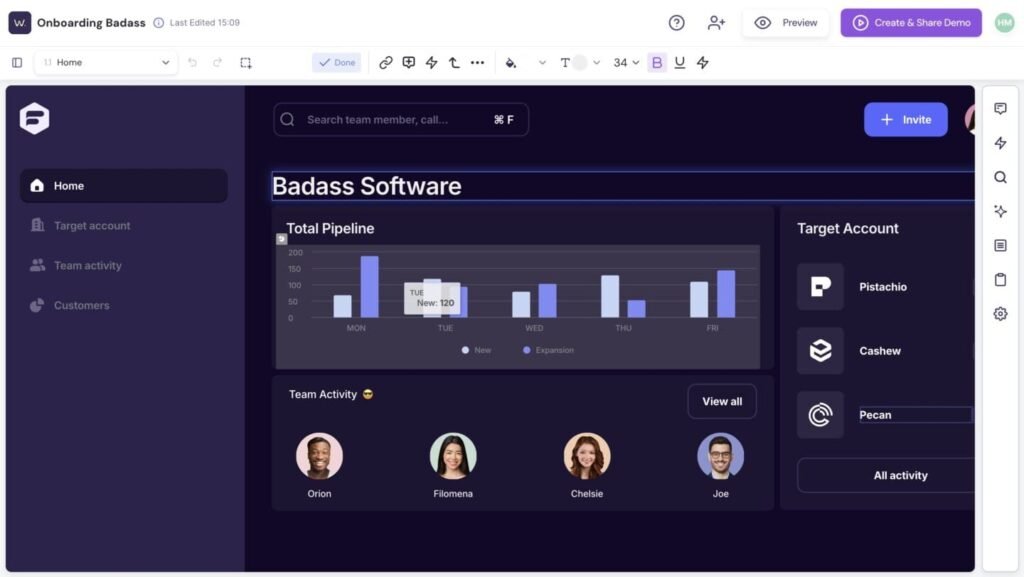
- Capture the real product. Record or screenshot the actual screens the user will click through.
- Add guidance. Use tooltips or highlights so the visitor never feels lost.
- Keep it short. Aim for 3–7 minutes of interaction. Longer demos lose viewers.
- Add a clear call to action. End with one obvious next step, not three.
- Test on mobile. Many buyers will open the demo link on a phone first.
- Track engagement. Use built-in analytics to see where viewers drop off, then improve that section.
Common Mistakes to Avoid
- Trying to show the entire product instead of one clear story.
- Skipping mobile testing before launch.
- Ending the demo without a call to action.
- Using outdated screenshots that don’t match the current product.
- Ignoring analytics after launch.
Pro Tip
Build the demo around a single customer problem, not a feature list. Buyers remember stories about outcomes, not button clicks.
Internal Linking Suggestions
- Link to a guide on “sales enablement content” using the anchor text sales enablement strategy
- Link to a page on “product-led growth” using the anchor text product-led growth approach
- Link to a “lead generation tools” resource using the anchor text tools that generate qualified leads
- Link to a “landing page optimization” article using the anchor text optimize your landing pages
- Link to a “customer onboarding” guide using the anchor text improve customer onboarding
External Linking Suggestions
- Google Search Central – for current Helpful Content and EEAT guidance
- HubSpot Research or Blog – for B2B buyer behavior statistics
- Gartner – for data on how buyers research software before contacting sales
Frequently Asked Questions
What is an interactive product demo?
It’s a clickable, self-guided walkthrough of a product that lets visitors explore real features on their own, without a sales call or software install.
How is an interactive demo different from a product video?
A video is passive; the viewer just watches. An interactive demo requires the viewer to click and take action, which keeps them more engaged.
Do I need coding skills to build one?
No. Most modern demo platforms are no-code and let marketing teams build demos using screenshots and drag-and-drop tools.
How long should an interactive product demo be?
Between three and seven minutes of interaction is usually enough to show value without losing the viewer’s attention.
Where should I place an interactive demo on my website?
Common placements include the homepage, pricing page, and dedicated landing pages linked from ads or email campaigns.
Can an interactive demo replace a live sales demo?
It can replace the very first live demo for many buyers, but most companies still use a live call for complex deals or enterprise buyers.
What metrics should I track?
Track completion rate, time spent per screen, drop-off points, and the conversion rate to your call-to-action.
Are interactive demos good for mobile users?
Yes, as long as the demo is built and tested specifically for smaller screens before launch.
How much does interactive demo software cost?
Pricing varies widely by provider and company size, so it’s best to compare current quotes directly from vendors rather than rely on general estimates.
Can I personalize a demo for different industries?
Many platforms allow you to swap logos, company names, or sample data so the demo feels tailored to each visitor’s industry.
Conclusion
An interactive product demo gives buyers exactly what they want: a hands-on way to explore your product before they ever talk to sales. It works around the clock, scales to unlimited visitors, and gives your sales team real insight into what each prospect cares about. Whether you choose a click-through demo, a guided tour, or a full sandbox experience, the goal stays the same — let people discover your product’s value for themselves.
If you’re ready to turn more website visitors into real conversations, start with one clear use case and build from there.
Call to Action
Building your first interactive product demo doesn’t have to eat up your team’s week. Retool Master gives you the building blocks to turn real product screens into a guided, clickable experience your visitors can explore on their own time — no engineering team required. If you’re ready to let your product do the talking, it’s worth a look.